A sleep sound app does not have to cost anything to be useful at night. Many baby sound apps have a free part, and one in this guide describes itself as free from top to bottom.
What the free part holds changes a lot from app to app. In one it is a set of sounds and a timer. In another it is a long list of recordings, with extra sounds or a voice recorder kept for a paid plan. The useful questions are which sounds you can play without paying, and whether the timer and mixing come with the free version.
This guide sets out what six apps give for free and what needs a paid plan, as far as each store page says.
Side by side
App Store details as of November 18, 2026. "For" shows the Apple devices on each app's store page.
-
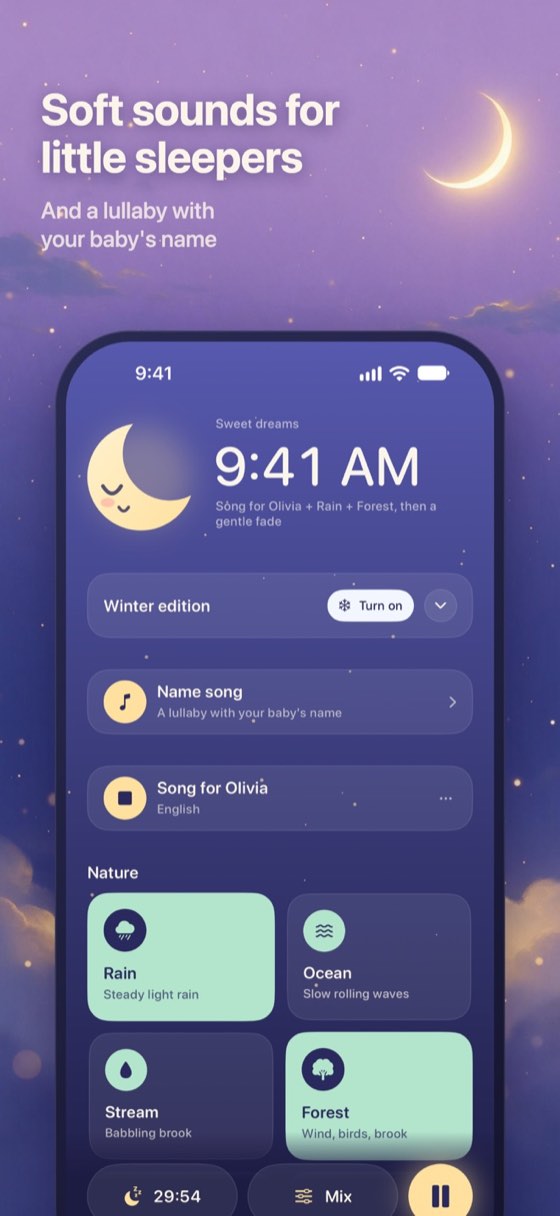
iPhone, iPad. Free, Pro optional. By Vesper AI. Updated Nov 2026.
Good for: Parents who want ten free sounds and a one-time Pro option
- 35 sleep sounds
- Plays without a signal
- No sign-up, no ads
- Android version too
Without paying, Lullsong gives you 10 of its 35 sounds and lets you mix two at once. Five of those free sounds keep playing with the screen locked. Recording your own shush, humming or singing is free, and that recording plays with the screen locked too. Name songs, lullabies that sing your baby's name, can be bought one at a time on the free plan, and they also play on a locked screen.
Lullsong Pro opens all 35 sounds, lets every one of them play with the screen locked and raises the mix to three. It adds Family Sharing on iPhone and includes name songs for the buyer: monthly subscribers get one each month, yearly subscribers two a year, and a lifetime purchase comes with two. Prices are shown in the App Store and on Google Play.
Both plans are free of ads and tracking, and neither asks you to make an account.
Get it on the App Store Also on Google PlayVisit the website
-
iPhone, iPad. Free, in-app purchases. By Phase4 Mobile, Inc. Updated Nov 2026.
Good for: Parents who want many free recordings and six-sound mixes
Baby HQ's store page spells out its free version: more than 50 stereo recordings, an auto-shusher, adjustable play and fade times, an auto-shutoff timer and unlimited mixes of six sounds. A subscription takes the library past 200 sounds and adds My Voice recordings, longer play and fade times and every future sound, without ads.
-
iPhone, iPad. Free, in-app purchases. By Michael Feigenson. Updated Jun 2026.
Good for: Parents who would like to try premium before paying for it
Sound Sleeper is free to start, and its store page makes an unusual offer. If you like the app, you can send the makers a message from inside it, and they say they will switch on premium for you to try. The listing names sound sets for each age, a Listen feature and sleep tracking, but does not say which of them are premium.
-
iPhone, iPad. Free, in-app purchases. By CM MentalGrowth Ltd. Updated Sep 2025.
Good for: Parents who want to start with sounds sorted by age
Baby Sleep Sounds sorts its library by age, from the months before birth to toddlers, with a part for parents. Its store page says a variety of sounds and the fade-out timer are free. A paid plan adds more than 100 extra sounds, a recorder for your own voice and a personalized sleep mode.
-
iPhone, iPad. Free, in-app purchases. By Piotr Kaluzynski. Updated Sep 2026.
Good for: Parents who want a lullaby app that calls itself fully free
Lullaby Songs for Sleep describes itself as a 100% free application. More than 24 lullabies are on its list, with Twinkle Twinkle Little Star, a Tudor lullaby and Jingle Bells among them, as well as nature sounds and relaxation music. You can choose how long the lullabies play and adjust the volume.
-
iPhone, iPad. Free, in-app purchases. By Slumber Studios, LLC. Updated Nov 2026.
Good for: Parents who want a long named list of free sounds
White Noise Deep Sleep Sounds names its free sounds on its store page. The list includes an air filter, a fan, a vacuum cleaner, an airplane cabin, driving in the rain, a heartbeat, crickets and light rain, plus two shush sounds. Lullabies, classical music and ASMR are among its premium sounds, though one classical piece, Gymnopedie Number 1, is on the free list. The free version plays sounds for eight hours, and continuous play needs a subscription.
How this guide was made
We read the free and paid sections of each app's App Store page and wrote down only what they state. Where a listing does not separate free features from paid ones, we say so instead of guessing. Lullsong's free and Pro plans are as its makers list them on lullsong.com. No app was bought to see what changes. Prices come from the US App Store and can differ by country.
Free parts and paid plans change over time. If one feature decides it for you, open the store page and read the current terms before you subscribe to anything.
Good to know
Is there a baby sleep app here with no paid plan at all?
Lullaby Songs for Sleep calls itself a 100% free application. Lullsong, Baby HQ, Sound Sleeper, Baby Sleep Sounds and White Noise Deep Sleep Sounds each describe a paid plan or premium on top of a free part.
What do you get in Lullsong without paying?
Ten sounds, mixing of two at a time and recordings of your own voice. Five of the free sounds play with the screen locked, and name songs can be bought one by one.
Does any app here sell a lifetime purchase?
Lullsong Pro is available as a one-time lifetime purchase, alongside monthly and yearly plans. The other listings in this guide do not mention a lifetime option.