The first weeks at home are a blur of feeds, diapers and short naps. Many parents reach for a phone in the dark with a baby on one arm, so the app has to be quick to use.
Two things matter most at this stage. The first is the kind of sound: womb, heartbeat and shush sounds are what many newborn apps are built around. The second is how the app behaves at night, with a timer that ends the sound for you and controls simple enough to work half awake.
Every app in this guide describes at least one of these on its store page. What you read about each one comes from that page.
Side by side
App Store details as of November 18, 2026. "For" shows the Apple devices on each app's store page.
-
iPhone, iPad. Free, Pro optional. By Vesper AI. Updated Nov 2026.
Good for: New parents who want womb, heartbeat and shush sounds in one place
- 35 sleep sounds
- Plays without a signal
- No sign-up, no ads
- Android version too
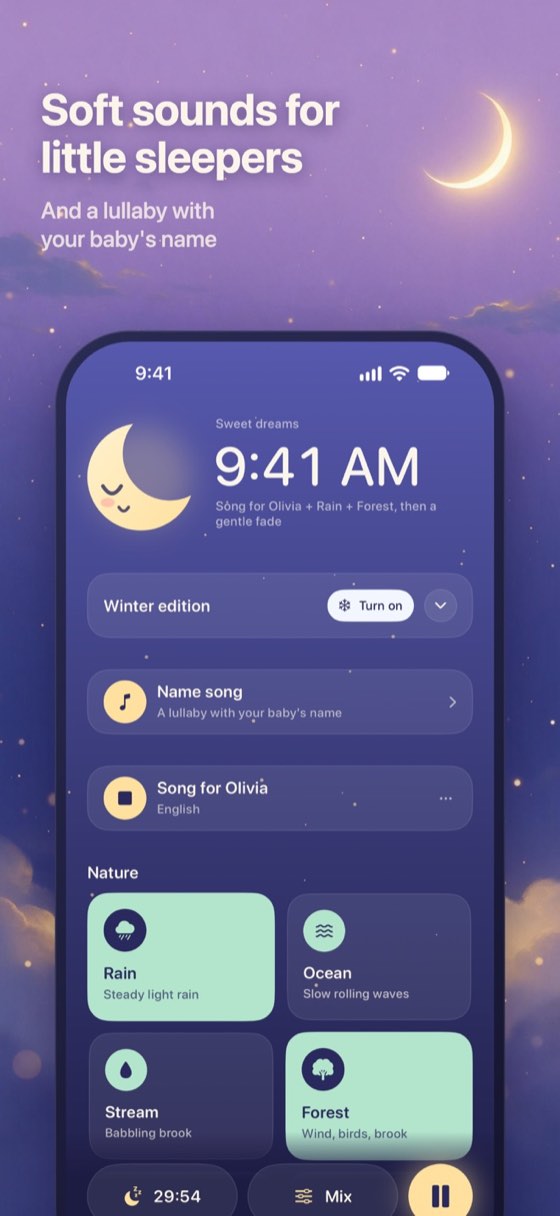
Lullsong keeps the sounds that newborn apps tend to be built around side by side: womb, heartbeat, a gentle shush and slow breathing, next to white, pink and brown noise. There are 35 sounds in all, and ten of them come free.
A 30-minute timer is on from the start, with a slow three-minute fade at the end. All-night play stays off until you choose it. You can layer two sounds without paying, or three with Lullsong Pro.
There is also a way to use your own voice. Record 10 to 30 seconds of shushing, humming or singing, and the app loops it. The recording stays on your phone.
Lullsong plays without a signal, with no account to create and no ads. It is on iPhone and Android. Pro is sold by the month, by the year or once for life.
Get it on the App Store Also on Google PlayVisit the website
-
iPhone, iPad. Free, in-app purchases. By Burleigh Creative Yazilim Ve Bilisim Hizmetleri Limited Sirketi. Updated Nov 2026.
Good for: Parents who want sounds sorted by age, starting with newborns
Sleeptot sorts its sounds by stage, with categories such as Newborn, Infants and Toddlers, plus lullabies and a few sounds for parents. The makers describe the app as recreating the rhythmic tones of the womb. Its store page also mentions a plain design meant to stop you fumbling in the dark, favorites you mark with a heart, and a fade-out you set yourself.
-
iPhone, iPad. Free, in-app purchases. By Michael Feigenson. Updated Jun 2026.
Good for: Parents who want only a handful of newborn sounds to pick from
Sound Sleeper keeps its list short on purpose. Its store page names five sounds for newborns, such as Womb and Hairdryer, with separate small sets for infants, toddlers and parents. A feature called Listen starts the sound you chose as soon as the phone hears crying, so you do not have to get up to press play.
-
iPhone, iPad. $1.99. By Baby Shusher LLC. Updated Jul 2024.
Good for: Parents who want one button and a dark screen at night
Baby Shusher is built around a single rhythmic shush. Its store page describes a simple, one-click sound machine, and the shush plays in a dark night mode so the phone adds less light to the room. It can also keep running in the background while you check something in another app.
-
iPhone, iPad. Free, in-app purchases. By CM MentalGrowth Ltd. Updated Sep 2025.
Good for: Parents who like a section made for the first three months
Baby Sleep Sounds splits its library by age, and one section covers newborns from birth to three months. Its store page lists white noise, heartbeat and fan among more than 100 sounds, along with a shusher and a voice recorder. According to the listing, the fade-out timer is part of the free version.
-
iPhone, iPad. Free, in-app purchases. By Ali Can Batur. Updated Dec 2021.
Good for: Parents who want to press play without signing up first
Lullin keeps the start simple: open it, tap a sound and it plays. Its store page says there is no registration and no login, and the app works without an internet connection. You can mix white noise with a lullaby, save that mix for later, and let the sound fade out gradually rather than stop at once.
How this guide was made
We went through App Store pages of baby sound apps and kept the ones that mention newborns or name womb, heartbeat and shush sounds. Each app other than Lullsong is described only from its own store listing. For Lullsong we used the fact sheet published on lullsong.com. Nothing here was measured in a lab, and no app was put through a trial at home. Prices, supported devices and the last update date come from the App Store.
Store pages change, so the sound names here reflect what the listings said in November 2026. If you want a broader list of steady sounds, the guide to white noise apps covers more of them.
Good to know
Which sounds do newborn apps usually offer?
Most apps in this guide list some mix of womb, heartbeat, shush and steady noise. The exact names differ, so the sound list on each store page is the best place to compare them.
Can an app react when my baby cries?
Two apps here describe something like that. Sound Sleeper's Listen feature plays your chosen sound when the phone hears crying, and Baby Shusher describes a shush whose volume follows the crying.
Do I need an account for these apps?
Lullsong needs no account, and Lullin's store page says there is no registration or login. Sign-up is not mentioned either way on the other store pages here.